> ## Documentation Index
> Fetch the complete documentation index at: https://docs.openfinance-hackathon.com/llms.txt
> Use this file to discover all available pages before exploring further.
# Open Finance Data Sharing
> Step-by-step guide to initiate your first Open Finance data sharing request using the Postman Collection, including creating consent, authorizing in the sandbox, obtaining an access token, and initiating the data sharing request.
export const Carousel = () => {
const images = [{
src: '/images/model-bank/authenticate.png',
alt: 'Step 1',
title: 'Authenticate at AlTareq Model Bank'
}, {
src: '/images/model-bank/authorize.png',
alt: 'Step 5',
title: 'Authorize the consent'
}];
let currentIndex = 0;
const showSlide = index => {
const slides = document.querySelectorAll(".carousel-image");
const titles = document.querySelectorAll(".carousel-title");
const tags = document.querySelectorAll(".carousel-tagline");
const steps = document.querySelectorAll(".carousel-step");
slides.forEach((img, i) => img.style.display = i === index ? "block" : "none");
titles.forEach((title, i) => title.style.display = i === index ? "block" : "none");
tags.forEach((tag, i) => tag.style.display = i === index ? "block" : "none");
steps.forEach((step, i) => step.textContent = `Step ${index + 1}/${images.length}`);
};
const next = () => {
currentIndex = (currentIndex + 1) % images.length;
showSlide(currentIndex);
};
const prev = () => {
currentIndex = (currentIndex - 1 + images.length) % images.length;
showSlide(currentIndex);
};
React.useEffect(() => {
showSlide(0);
}, []);
return
{images.map((img, i) =>
{img.title}
)}
Step 1/{images.length}
;
};
Now that you have imported the Postman collection, set the environment variables, and configured your MTLS certificates, you are ready to start communicating with the APIs.
This guide will walk you through **initiating a bank data sharing request step by step**.
## Step 1 – Creating a Consent
Before initiating a bank data sharing request, you must first **create a consent request**.
This involves making the following three requests in sequence:
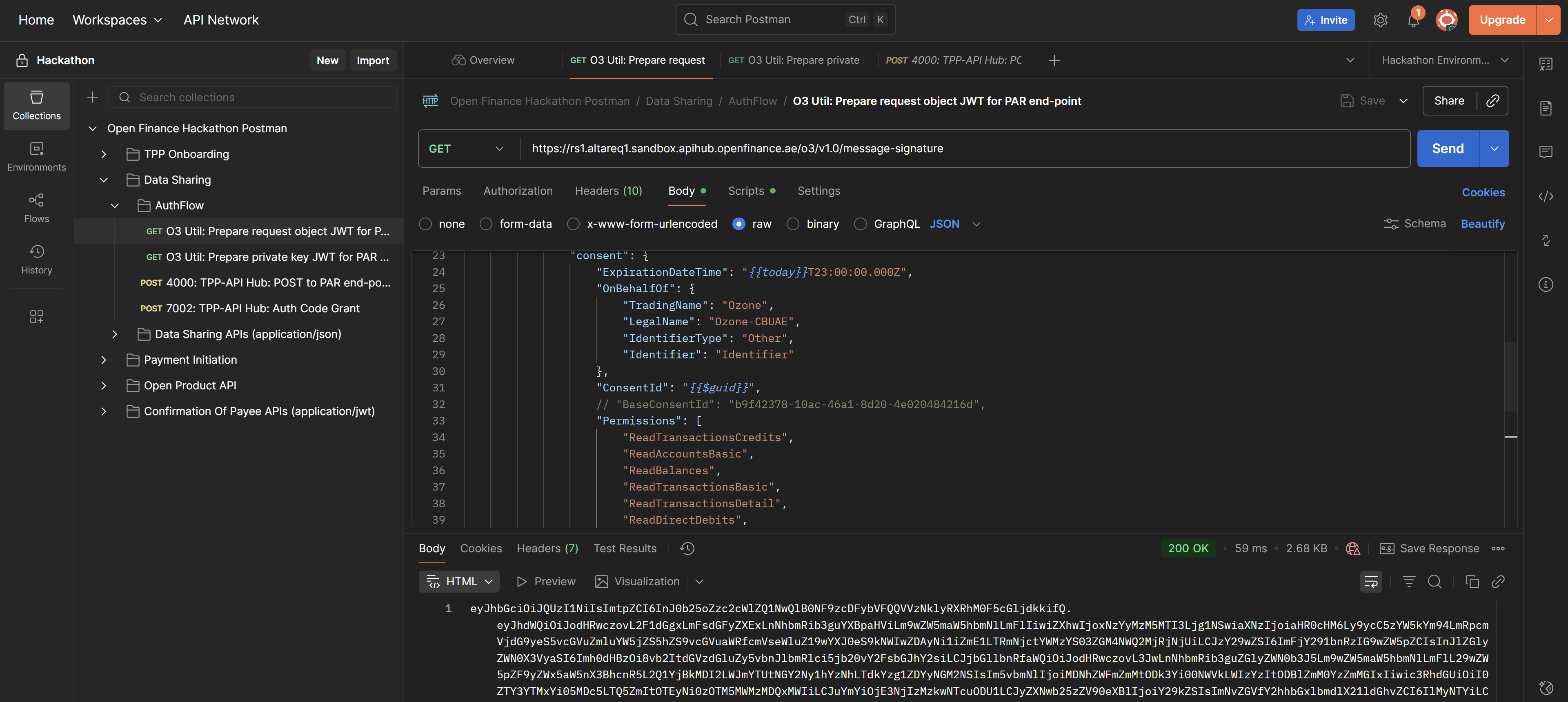
### 1. O3 Util: Prepare request object JWT for PAR endpoint
**Endpoint:**
`https://rs1.altareq1.sandbox.apihub.openfinance.ae/o3/v1.0/message-signature`
**Purpose:**\
This request converts the RAR object in the body into a **JWT signed with your private signing key**.
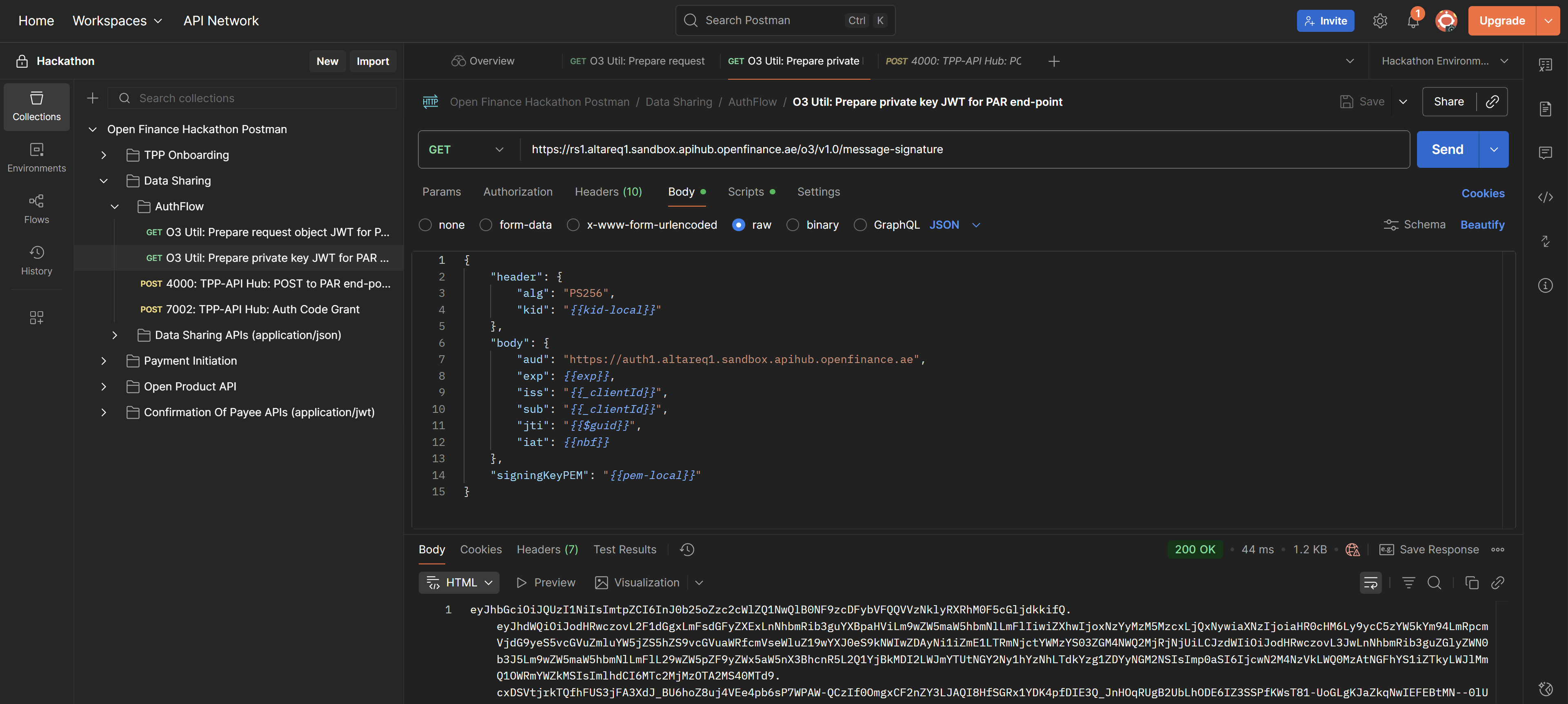
### 2. O3 Util: Prepare private key JWT for PAR endpoint
**Endpoint:**\
`https://rs1.altareq1.sandbox.apihub.openfinance.ae/o3/v1.0/message-signature`
**Purpose:**\
This request converts the RAR object in the body into a **JWT signed with your private signing key**, creating your **Client Assertion**.
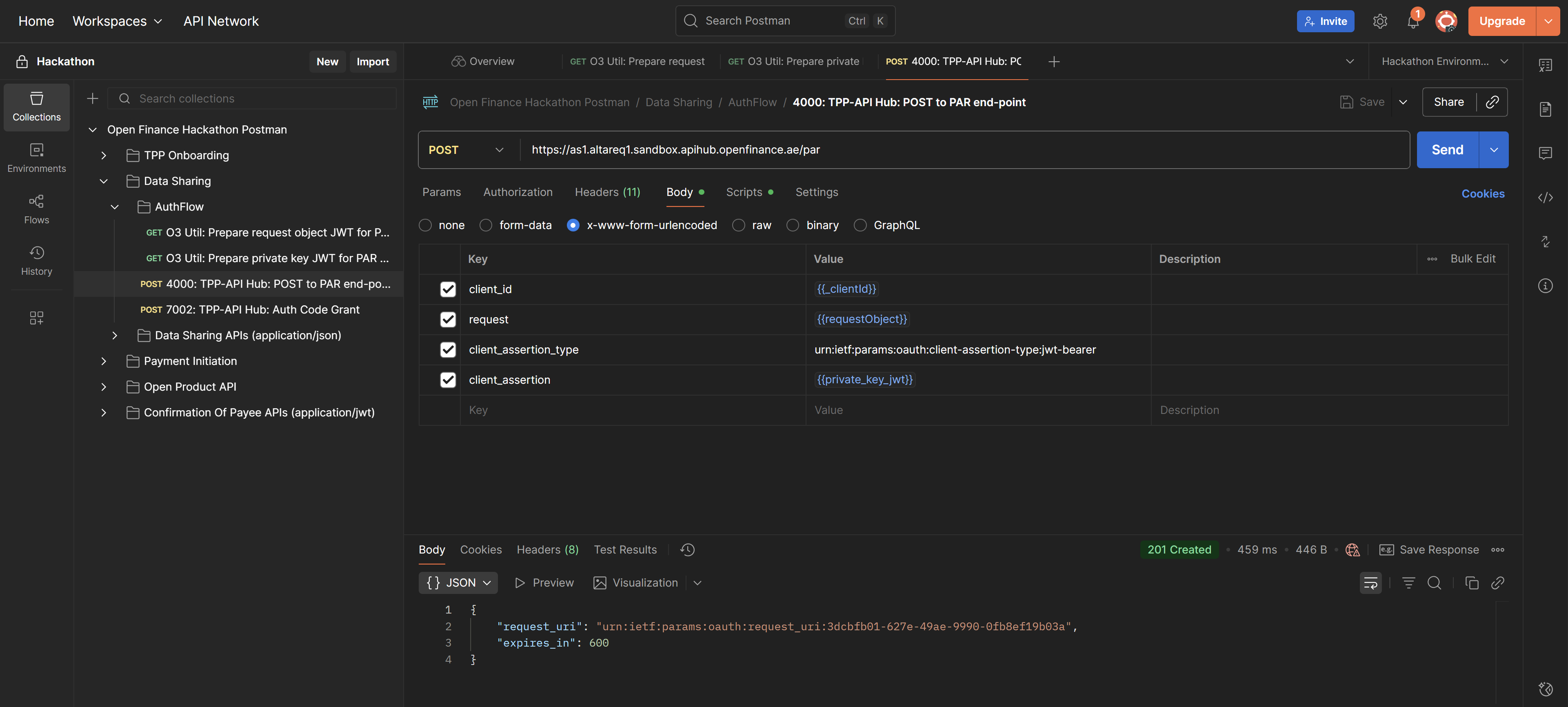
### 3. 4000: TPP-API Hub – POST to PAR endpoint
**Endpoint:**\
`https://as1.altareq1.sandbox.apihub.openfinance.ae/par`
**Purpose:**\
This request sends the JWTs constructed in the O3 Utils to the **AlTareq Model Bank's authorization server** to stage the consent.\
It returns the details required to construct the **redirect to the Model Bank**, allowing the user to complete **authentication and authorization**.
## Step 2 – Convert the PAR Response into a Redirect URI
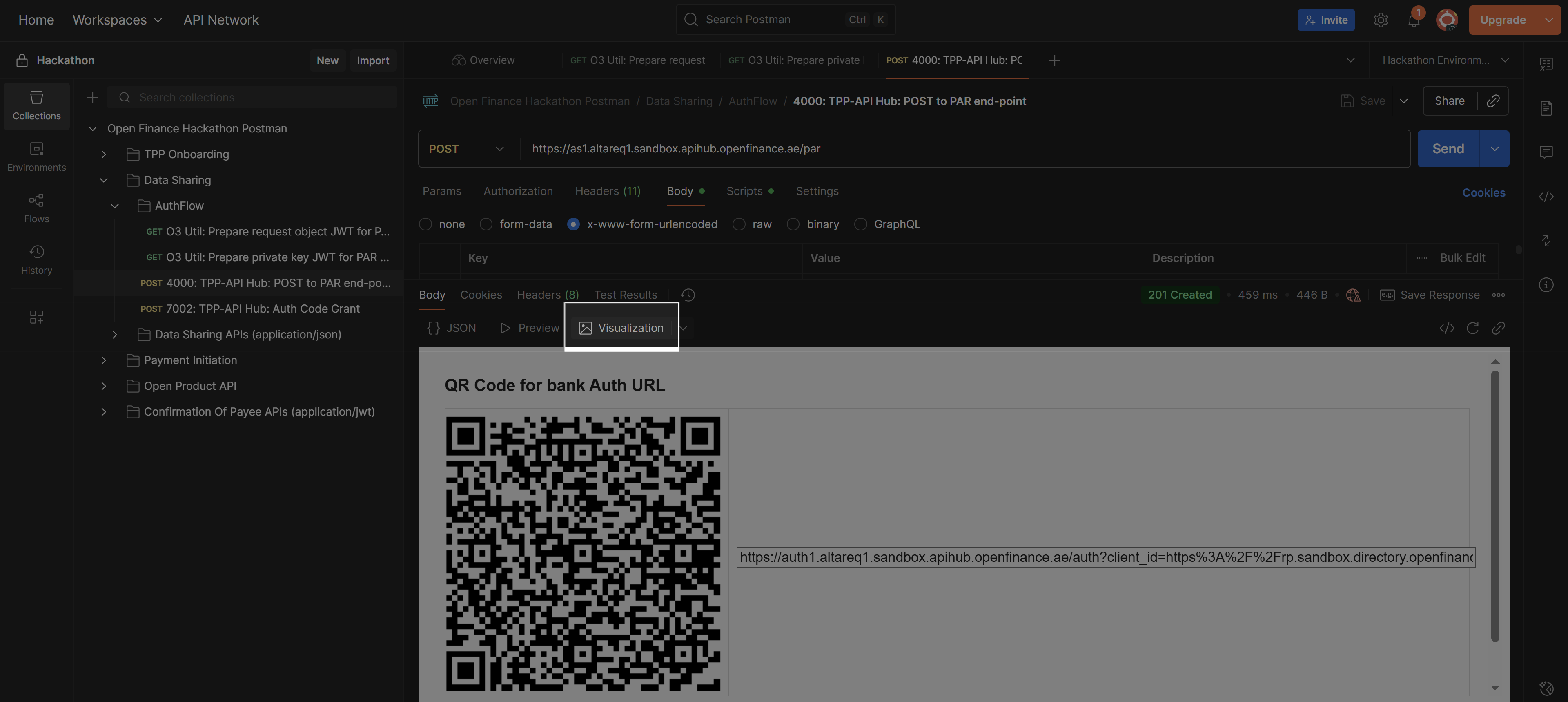
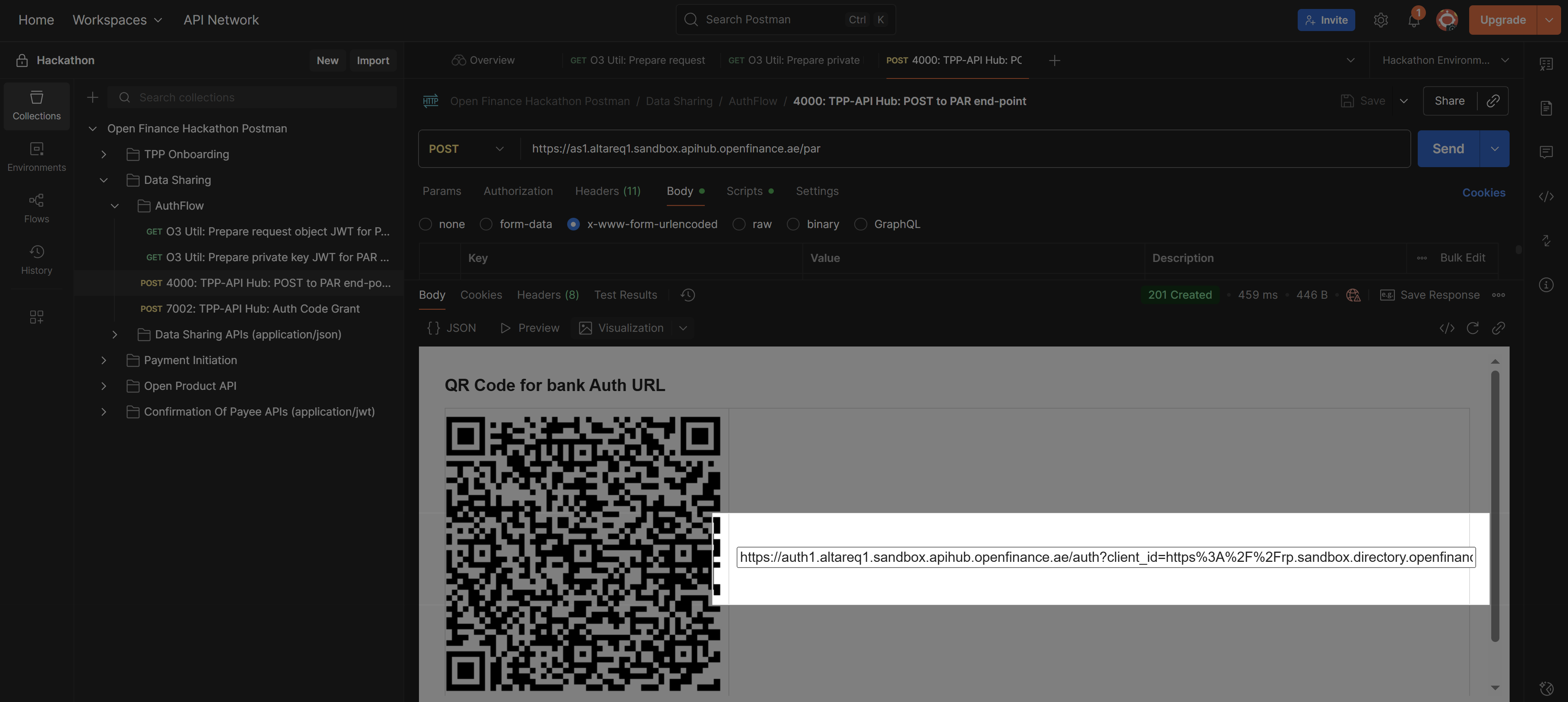
After completing the POST request to the PAR endpoint, you will receive a response containing the information needed to redirect the user to the Model Bank for authentication and consent.
In Postman, you can easily extract the redirect link by using the **Visualize** tab. This displays the redirect URI, which you can then open in a browser to allow the user to complete the **authentication and authorization** process.
## Step 3 – Authenticate and Authorize in the Al Tareq Sandbox Model Bank
Once you open the `redirect` URL from the previous step, you’ll be taken to the **Al Tareq Sandbox Model Bank** for authentication and authorization.
### Authentication
You’ll need to sign in using the **credentials** provided in your client pack. These include the **username** and **password** assigned specifically for your testing users.
After successful authentication, you’ll be redirected to the consent authorization screen.
### Authorization
On this screen, you will be prompted to **select the accounts** to share the data from. You’ll also see the details of the consent you created earlier — including:
* The **data permissions**
* The **consent expiry date**
...
Once you confirm and authorize the consent, the Al Tareq Sandbox Model Bank will process your authorization and redirect you back to the redirect URI:
`http://localhost:1411/hackathon-redirect`
with an authorization code.
💡 **Tip:** Example of a successful callback
`http://localhost:1411/hackathon-redirect?code=4c5d6295-ff1b-4d13-a232-1eebacec9a0c&state=9d196e63-9bc2-4c28-8bf9-225c07ce0fc5&iss=https://auth1.altareq1.sandbox.apihub.openfinance.ae`
## Step 4 – Get an Access Token
After successfully authorizing the consent in the **Al Tareq Sandbox Model Bank**, you will be redirected back with an **authorization code** included in the callback URL.
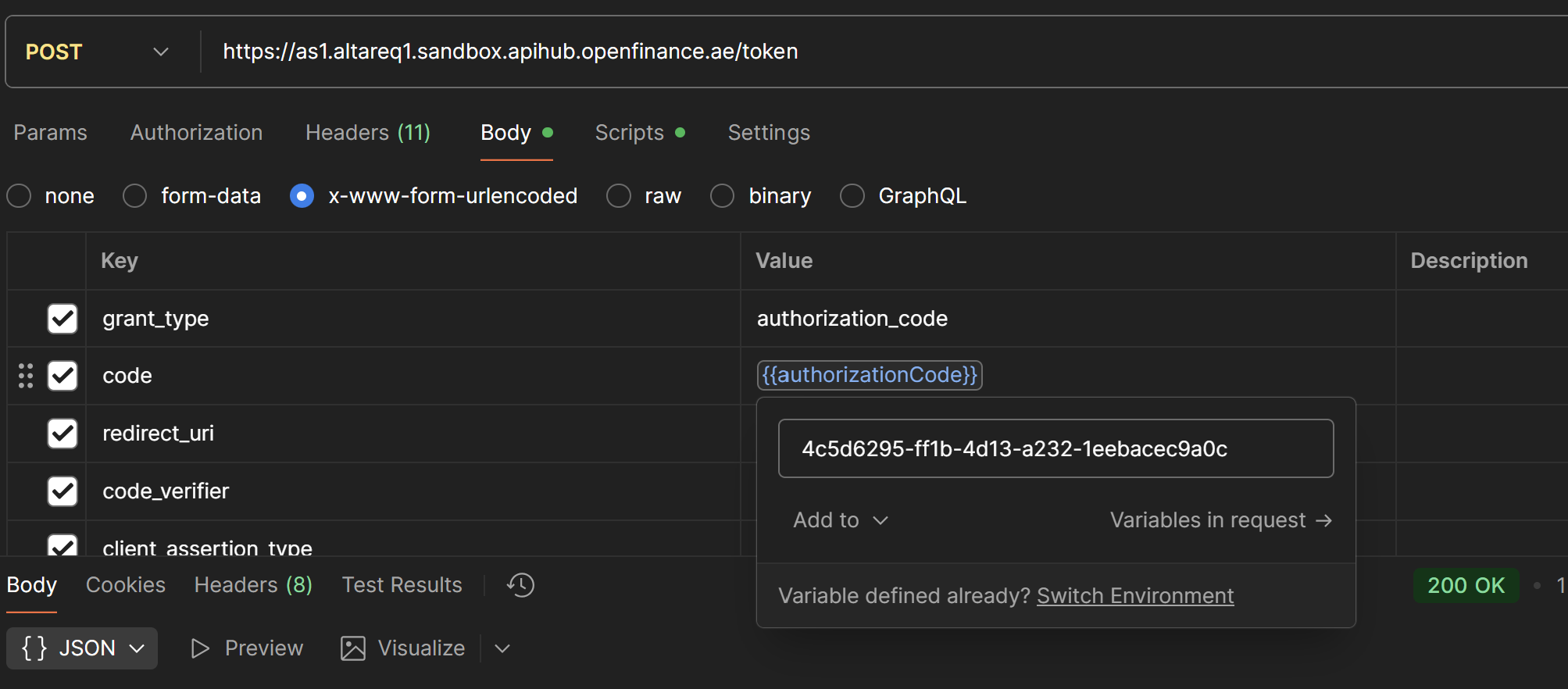
You can now exchange this code for an **access token** using the following request:
**Endpoint:**\
`https://as1.altareq1.sandbox.apihub.openfinance.ae/token`
Set the `{{authorizationCode}}` variable with the code obtained from the URL.\
For example, if your callback URL contains the code: `4c5d6295-ff1b-4d13-a232-1eebacec9a0c` (like the example above) then that is the value you should use.
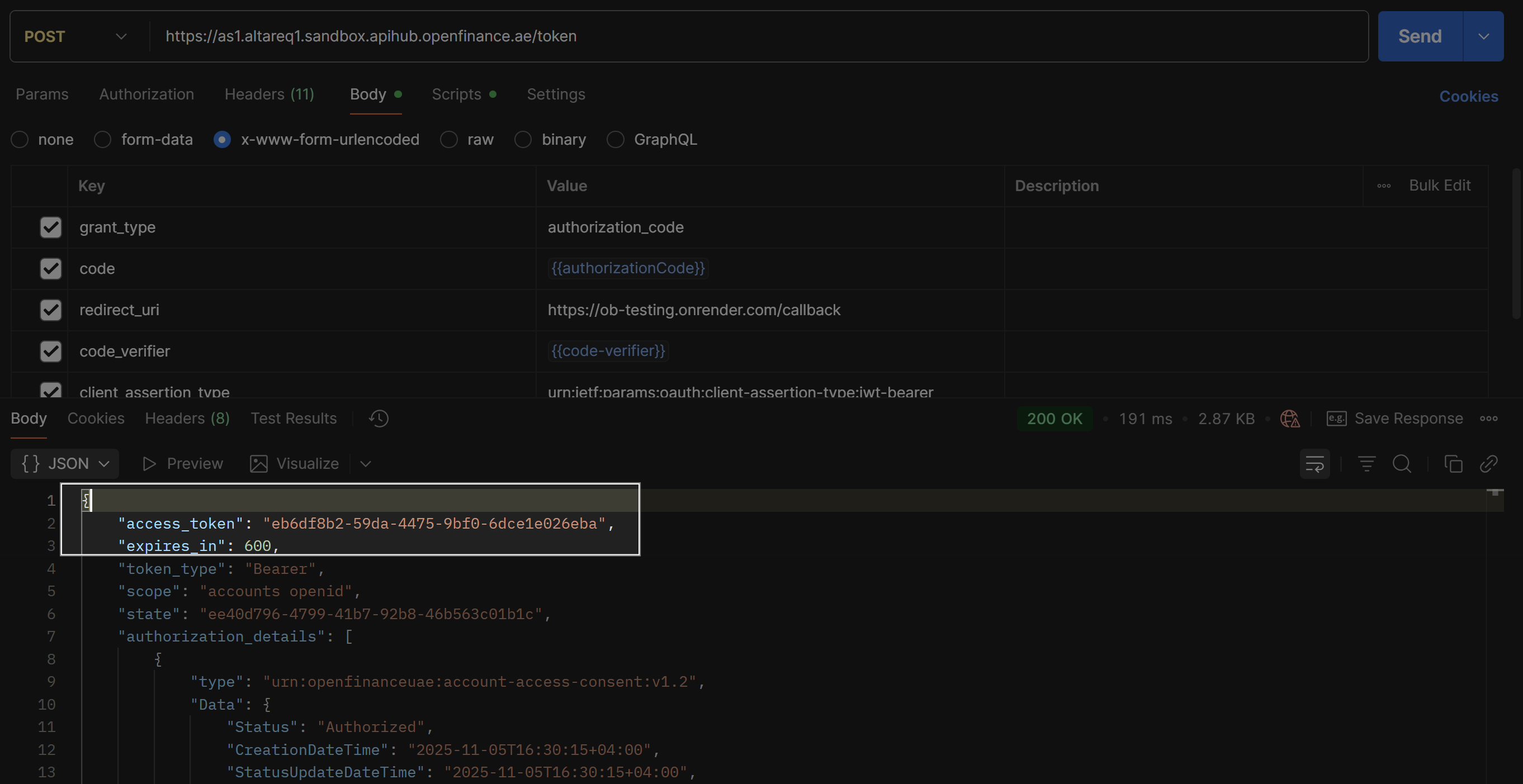
If the request is successful, the response will contain your **Access Token**:
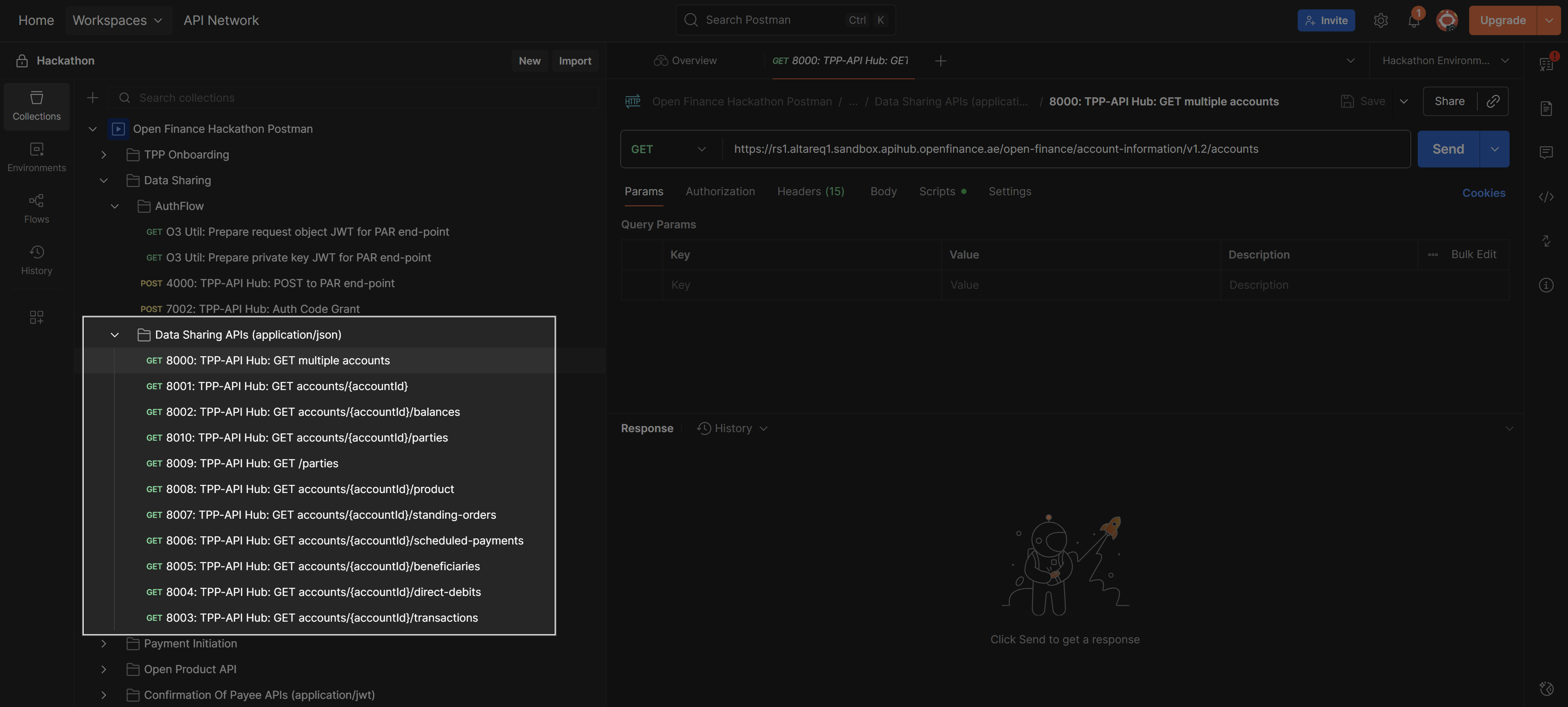
## Step 5 – Make Data Sharing Requests
Once you have an access token, you can make **data sharing requests** according to the consent permissions set in the earlier step (`O3 Util: Prepare request object JWT for PAR endpoint`).
The Postman will automatically set the token in the `Authorization` header of your requests to access the endpoints:
 ### 2. O3 Util: Prepare private key JWT for PAR endpoint
**Endpoint:**\
`https://rs1.altareq1.sandbox.apihub.openfinance.ae/o3/v1.0/message-signature`
**Purpose:**\
This request converts the RAR object in the body into a **JWT signed with your private signing key**, creating your **Client Assertion**.
### 2. O3 Util: Prepare private key JWT for PAR endpoint
**Endpoint:**\
`https://rs1.altareq1.sandbox.apihub.openfinance.ae/o3/v1.0/message-signature`
**Purpose:**\
This request converts the RAR object in the body into a **JWT signed with your private signing key**, creating your **Client Assertion**.
 ### 3. 4000: TPP-API Hub – POST to PAR endpoint
**Endpoint:**\
`https://as1.altareq1.sandbox.apihub.openfinance.ae/par`
**Purpose:**\
This request sends the JWTs constructed in the O3 Utils to the **AlTareq Model Bank's authorization server** to stage the consent.\
It returns the details required to construct the **redirect to the Model Bank**, allowing the user to complete **authentication and authorization**.
### 3. 4000: TPP-API Hub – POST to PAR endpoint
**Endpoint:**\
`https://as1.altareq1.sandbox.apihub.openfinance.ae/par`
**Purpose:**\
This request sends the JWTs constructed in the O3 Utils to the **AlTareq Model Bank's authorization server** to stage the consent.\
It returns the details required to construct the **redirect to the Model Bank**, allowing the user to complete **authentication and authorization**.
 ## Step 2 – Convert the PAR Response into a Redirect URI
After completing the POST request to the PAR endpoint, you will receive a response containing the information needed to redirect the user to the Model Bank for authentication and consent.
In Postman, you can easily extract the redirect link by using the **Visualize** tab. This displays the redirect URI, which you can then open in a browser to allow the user to complete the **authentication and authorization** process.
## Step 2 – Convert the PAR Response into a Redirect URI
After completing the POST request to the PAR endpoint, you will receive a response containing the information needed to redirect the user to the Model Bank for authentication and consent.
In Postman, you can easily extract the redirect link by using the **Visualize** tab. This displays the redirect URI, which you can then open in a browser to allow the user to complete the **authentication and authorization** process.
 ## Step 3 – Authenticate and Authorize in the Al Tareq Sandbox Model Bank
Once you open the `redirect` URL from the previous step, you’ll be taken to the **Al Tareq Sandbox Model Bank** for authentication and authorization.
## Step 3 – Authenticate and Authorize in the Al Tareq Sandbox Model Bank
Once you open the `redirect` URL from the previous step, you’ll be taken to the **Al Tareq Sandbox Model Bank** for authentication and authorization.
 If the request is successful, the response will contain your **Access Token**:
 ## Step 5 – Make Data Sharing Requests
Once you have an access token, you can make **data sharing requests** according to the consent permissions set in the earlier step (`O3 Util: Prepare request object JWT for PAR endpoint`).
The Postman will automatically set the token in the `Authorization` header of your requests to access the endpoints:
## Step 5 – Make Data Sharing Requests
Once you have an access token, you can make **data sharing requests** according to the consent permissions set in the earlier step (`O3 Util: Prepare request object JWT for PAR endpoint`).
The Postman will automatically set the token in the `Authorization` header of your requests to access the endpoints: